Automated AWS Network Topology Diagram with AI
Connect AWS and Obelinf to an AI assistant, inventory cloud network resources, and turn verified records into an AWS network topology diagram.
On this page
An AWS network topology diagram is useful only when it reflects the infrastructure that is actually deployed. Drawing VPCs, subnets, instances, and connections by hand can take hours, and a static diagram begins to drift as soon as the account changes. You can reduce that manual work by asking an AI assistant to inspect AWS and create structured infrastructure records from what it can verify.
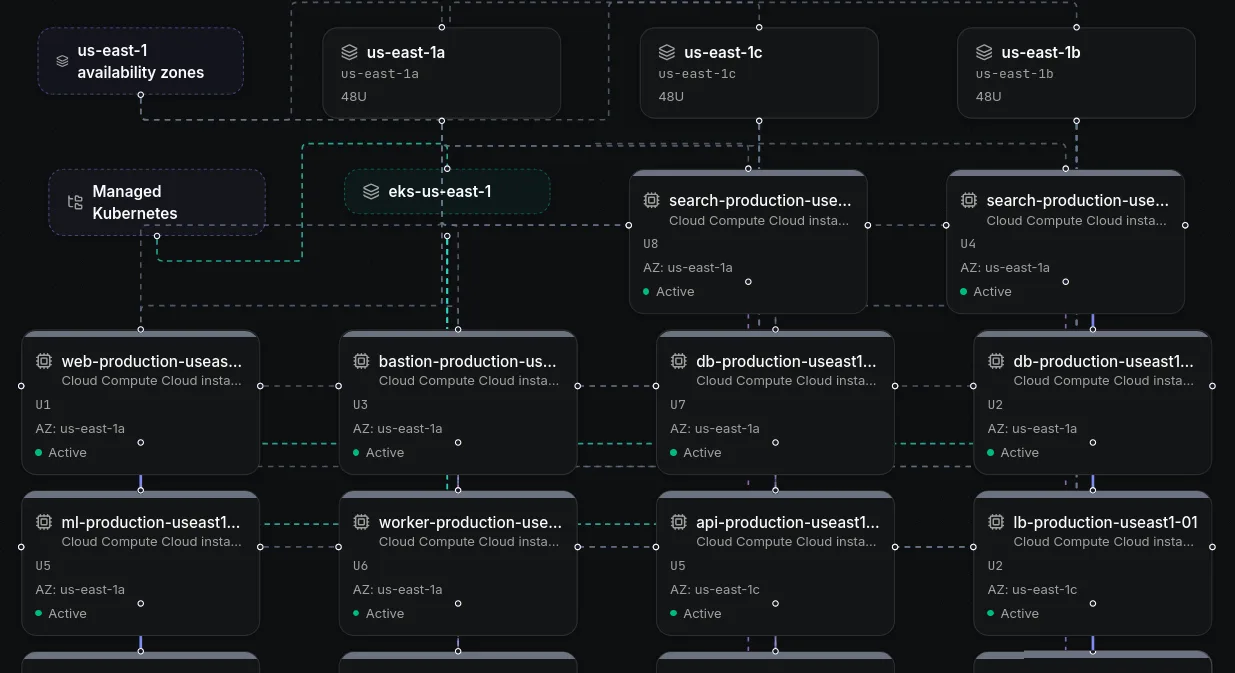
This tutorial connects an AI assistant to AWS and Obelinf through MCP. AWS remains the read only source for discovery, while Obelinf stores the documented resources and renders their relationships as a topology. It is an agent assisted documentation workflow, not a live network scanner, so review the records and connections before relying on the diagram.
What the AWS to Obelinf workflow does
The assistant acts as the bridge between two systems. An AWS MCP connection lets it query the services allowed by your AWS identity. An Obelinf MCP connection lets it create infrastructure documentation in the organization you choose. The assistant translates verified AWS details into sites, devices, subnets, interfaces, and relationships that Obelinf can represent.
The important distinction is that AWS does not directly generate the Obelinf diagram. The assistant reads AWS, writes the relevant records, and Obelinf visualizes those records. If a relationship cannot be confirmed from available AWS data, leave it undocumented rather than asking the model to guess.
Prepare access before connecting
Use an AWS identity dedicated to documentation. Grant it only the read permissions needed for the services in scope. For a first pass focused on VPC and EC2 inventory, a policy can allow the relevant ec2:Describe* actions. If you also need Direct Connect details, add the relevant directconnect:Describe* actions. Expand the list only when the inventory requires another AWS service.
For example, this starter policy allows description calls for EC2 and Direct Connect resources. It is read only, but still broad within those services, so narrow it further if your environment allows it:
{
  "Version": "2012-10-17",
  "Statement": [
    {
      "Effect": "Allow",
      "Action": ["ec2:Describe*", "directconnect:Describe*"],
      "Resource": "*"
    }
  ]
}
The AWS MCP Server forwards requests under your AWS identity, and AWS evaluates that identity’s existing permissions. OAuth allows a quick browser based connection, while the SigV4 proxy is the better choice when you want read only mode to hide write capable tools or need multiple AWS profiles. OAuth also requires the IAM identity to have the AWSMCPSignInOAuthAccessPolicy. That policy authorizes the connection, while separate service permissions control which resources the assistant can read. In either case, use IAM to prevent writes. A sentence in an AI prompt is not an access control.
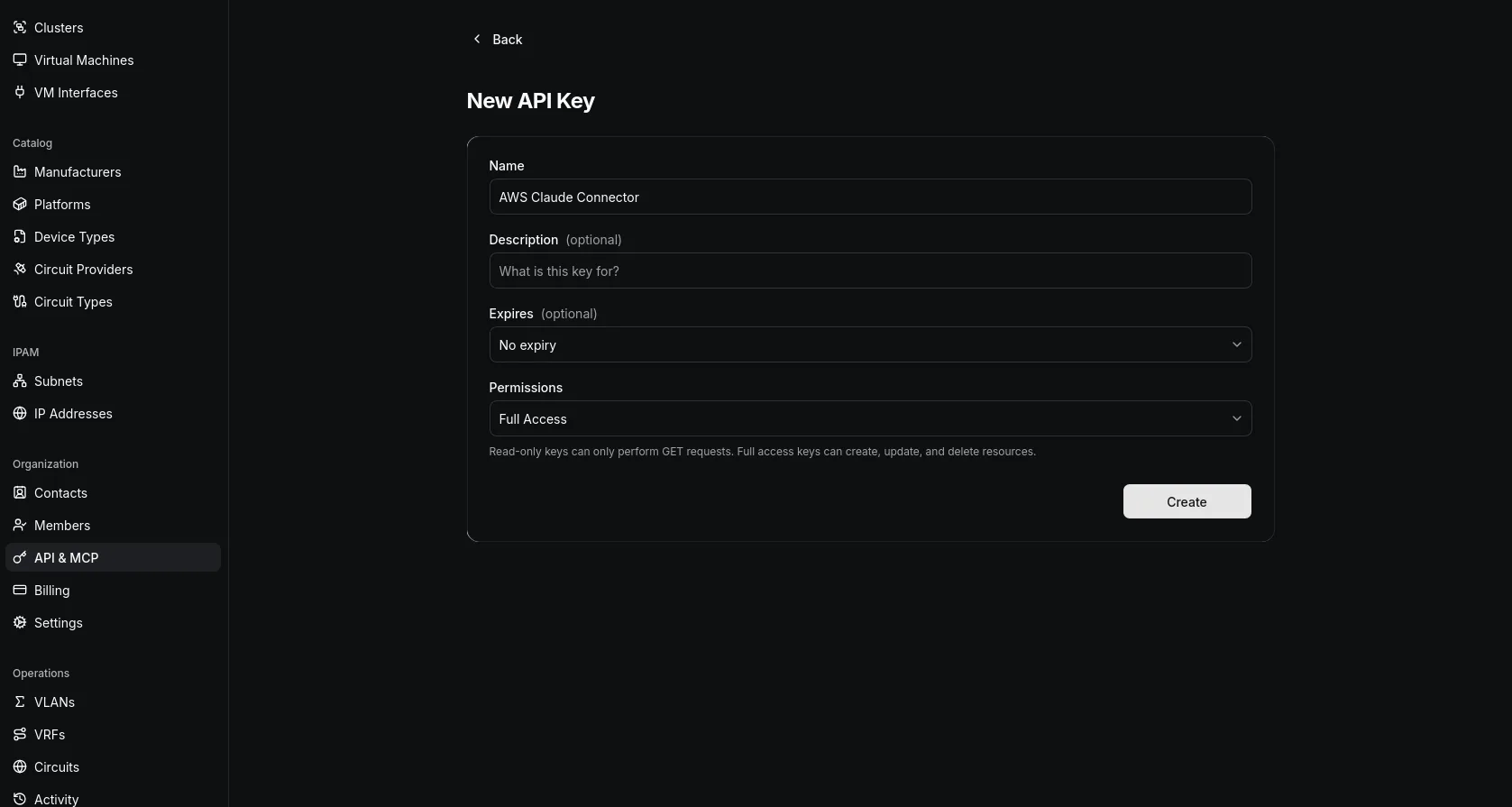
For Obelinf, create a separate API and MCP key for this workflow. The assistant must be able to write documentation, so choose Full Access only for the organization you intend to populate. Full Access also permits updates and deletions, so require your approval before write calls and do not rely on the prompt as the only safeguard. Keep the key private, store it in your MCP client’s secret storage where possible, and revoke it when the workflow is no longer needed. Obelinf records changes in the changelog, which gives you a way to review what the agent created.
Connect Claude to AWS
AWS currently offers a managed AWS MCP Server. For Claude Code, the quick OAuth connection uses the AWS endpoint and a browser authorization step:
claude mcp add aws-mcp https://aws-mcp.us-east-1.api.aws/mcp --transport httpFor Claude Desktop, add the remote server URL https://aws-mcp.us-east-1.api.aws/mcp?oauth=initialize in the MCP settings. The first tool call opens AWS Sign in so you can authorize the identity. If your organization prefers local AWS credentials, use the SigV4 setup in the AWS MCP Server guide instead. The AWS guide lists the current supported regions, client instructions, and permission model, so check it before configuring a different client.
After connecting, ask the assistant to confirm the AWS account identity and which regions it can query. Limit the first inventory to a specific account, region set, and service list. A focused scope makes the output easier to validate and reduces the chance that relevant resources are missed in an unbounded request.
Connect Obelinf and verify both servers
In Obelinf, open API & MCP, create a key for this task, and copy the client configuration shown after creation. That generated configuration includes the current server details for the selected organization. Add it to the same Claude client where AWS MCP is already configured, then restart or reload the client if required.
Before asking the assistant to write anything, verify both connections separately. Ask it to identify the AWS account and list a few permitted resources. Then ask it to report the Obelinf organization name and available MCP tools. If either answer points to the wrong account or organization, stop and correct the connection before continuing.
Inventory AWS and create the topology records
Start with a plan that names the account, regions, and resource types to inspect. For a basic network view, include VPCs, subnets, route tables, gateways, network interfaces, and EC2 instances. Add Direct Connect, transit gateways, VPNs, load balancers, or other services when they are relevant and the AWS identity can read them. Ask the assistant to report permission errors rather than silently omitting resources.
Use a prompt with explicit guardrails, such as:
Use the AWS MCP server as a read only source. Never create, modify, stop, or delete AWS resources.
Inventory the VPC and network resources in account ACCOUNT_ID across REGIONS.
Before writing, show me the proposed Obelinf sites, devices, subnets, interfaces, and relationships.
Use only attributes and connections supported by the AWS results. Do not guess missing values.
Check Obelinf for matching records before creating anything. Do not delete or overwrite existing records.
Wait for my approval before writing the proposed batch to Obelinf.
After approval, create the records in manageable batches and summarize successes, omissions, and errors.
Compare the saved records with the AWS inventory and list anything that could not be represented.
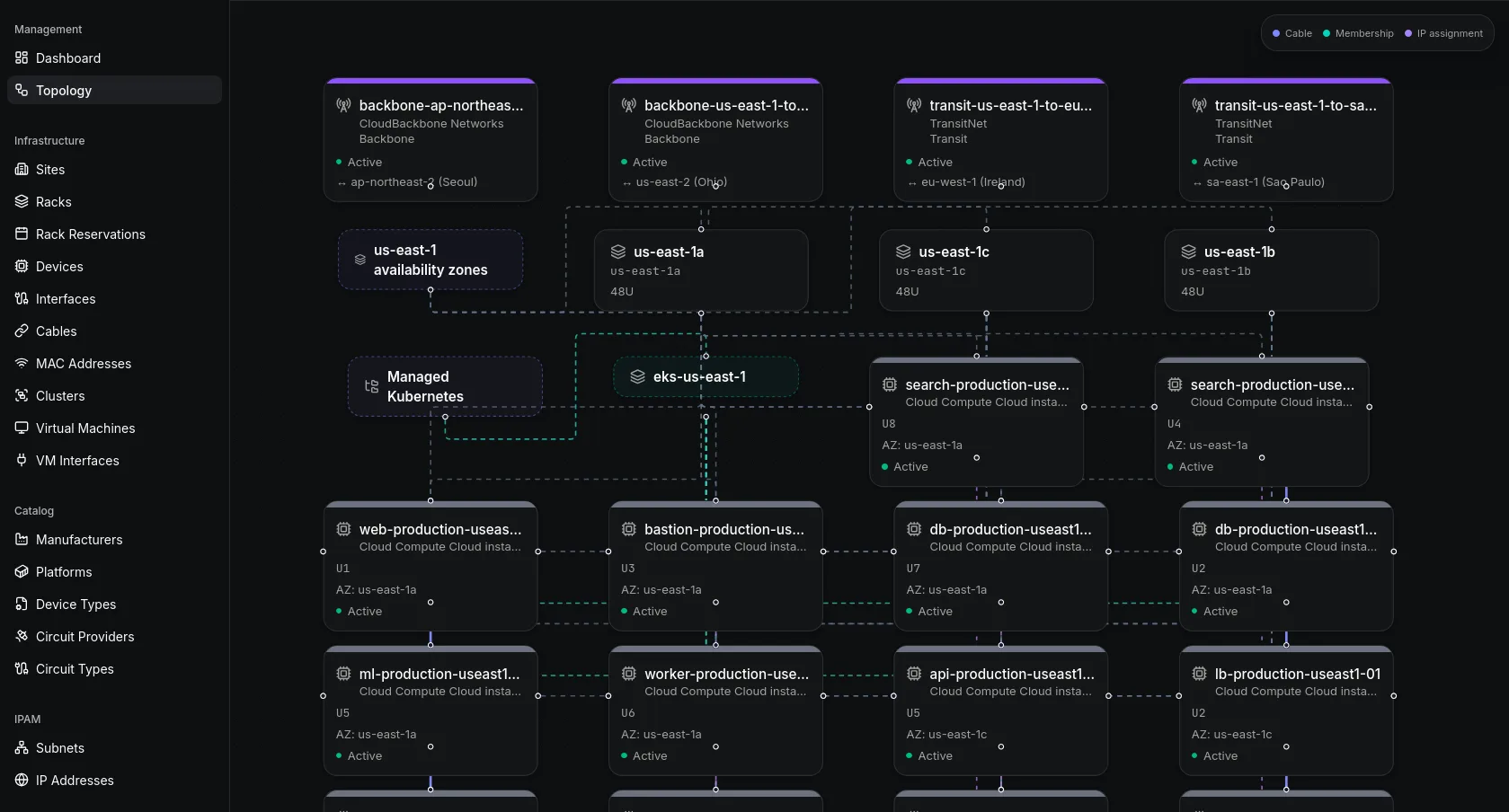
Review the proposed mapping before approving writes. AWS services do not always correspond one to one with physical network entities, and the fields available through an API vary by resource type. Keep cloud objects in the appropriate inventory records and only draw an edge when AWS provides evidence for that relationship. Obelinf’s network topology view is generated from the device and connection records you maintain.
Validate and maintain the diagram
When the assistant finishes, compare its summary with the AWS resource list. Check region coverage, duplicate names, subnet CIDRs, device types, and each proposed relationship. Open the topology view and confirm that the structure matches the documented records. Correct errors in the records, then regenerate or refresh the view as needed.
Treat the result as a documentation snapshot, not continuous discovery. AWS changes do not automatically update Obelinf unless you run the inventory workflow again or build a scheduled integration. Keep each run scoped, review changes before they are written, and inspect the changelog afterward. For more on the platform’s agent workflow, see AI infrastructure documentation and device inventory.
When this approach fits
An AI assisted import is useful when you want to turn existing cloud inventory into a browsable network reference without manually entering every record. It can also give your team a consistent first draft to review. It is not a substitute for AWS configuration monitoring, flow analysis, or a live discovery product. Choose the workflow based on whether you need a maintained inventory, operational telemetry, or both.
Obelinf’s free Personal plan includes core infrastructure records and topology for small environments. See Obelinf pricing for current plan limits. If you are comparing dedicated mapping products as well, our best network topology tools guide explains how documentation based topology differs from discovery and monitoring tools.
Frequently Asked Questions
Can AI create an AWS network topology diagram automatically?
What AWS permissions should an AI assistant have?
Can this workflow change my AWS infrastructure?
Does Obelinf scan AWS to discover network connections?
Stop reaching for a spreadsheet
Obelinf keeps every subnet, device, circuit, and rack in one live source of truth, with audit logs and a topology view. Free for personal use.
Related Articles
Best Network Topology Tools in 2026
Compare the best network topology tools for documentation, manual diagrams, automatic discovery, and live monitoring, with practical picks for different networks.
Read more
Network Topology Diagrams: Best Practices for Drawing and Keeping Them Current
Best practices for drawing network topology diagrams that stay accurate, covering physical and logical views, notation standards, change workflows, and automation.
Read more
AI Infrastructure Documentation: How to Automate It in 2026
Learn how to automate AI infrastructure documentation in 2026: connecting AI assistants to your source of truth over MCP, setting the right guardrails, and knowing when the REST API is the better fit.
Read more